CI/CD Project
Running a Local Kubernetes Cluster
Kubernetes clusters can have hundreds of nodes in production, but you can run a single-node cluster on your laptop and it works in the same way.
We'll also use Git for source control, so you'll need a client on your machine to talk to GitHub.
Git Client - Mac, Windows or Linux
Git is a free, open source tool for source control:
Docker Desktop - Mac or Windows
If you're on macOS or Windows 10 Docker Desktop is the easiest way to get Kubernetes:
The download and install takes a few minutes. When it's done, run the Docker app and you'll see the Docker whale logo in your taskbar (Windows) or menu bar (macOS).
On Windows 10 the install may need a restart before you get here.
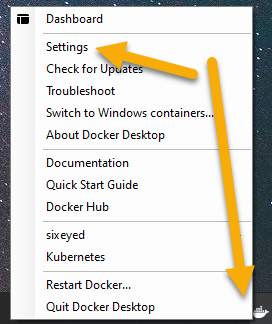
Right-click that whale and click Settings:
In the settings Windows select Kubernetes from the left menu and click Enable Kubernetes:
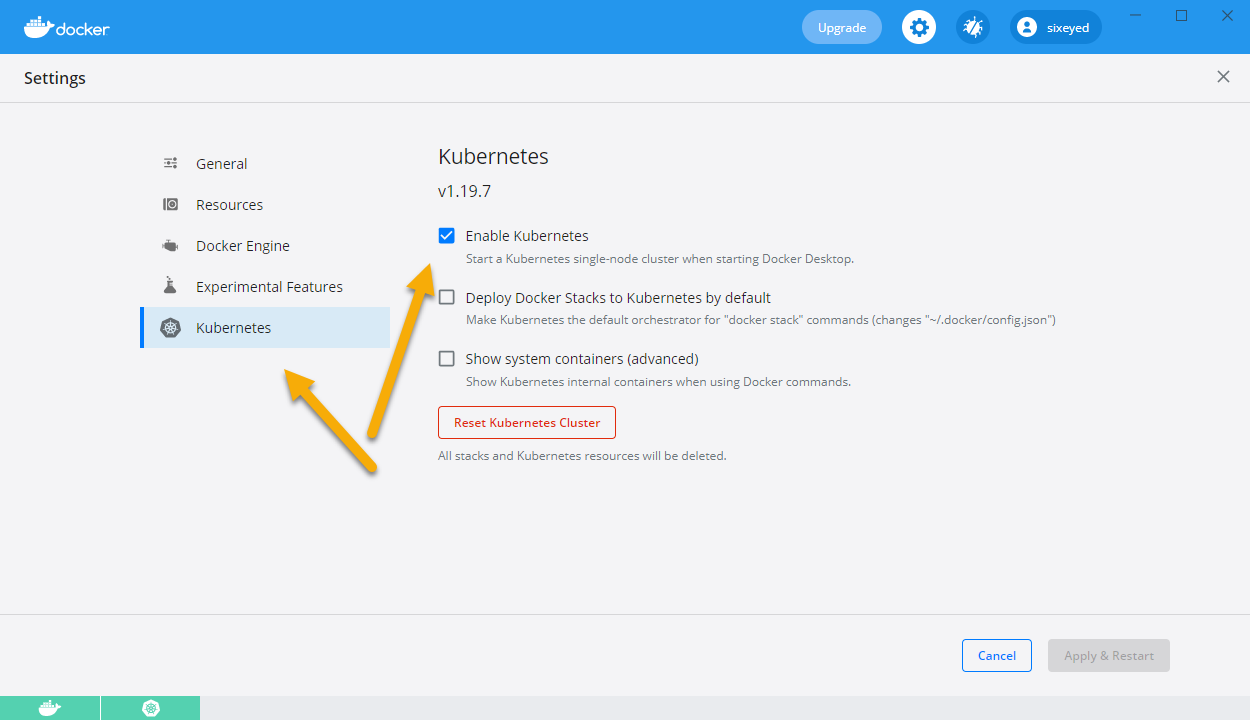
Docker downloads all the Kubernetes components and sets them up. That can take a few minutes too. When the Docker logo and the Kubernetes logo in the UI are both green, everything is running.
On some systems Kubernetes doesn't start properly with Docker Desktop. That's not a problem - you can use k3d instead
OR k3d - Linux, Windows or Mac
Running Kubernetes inside a container
On Linux k3d is a lightweight Kubernetes distribution with a good feature set. It runs a whole Kubernetes cluster inside a Docker container :)
You can use k3d on macOS and Windows too - but Docker Desktop is easier.
On Linux you need to install Docker and the k3d command line:
# on Linux
curl -fsSL https://get.docker.com | sh

curl -s https://raw.githubusercontent.com/rancher/k3d/main/install.sh | bash
On Mac or Windows, install Docker Desktop and then the k3d command line:
# On Windows using Chocolatey:
choco install k3d

# On MacOS using brew:
brew install k3d
Then you can create a cluster:
# all systems
k3d cluster create k8s -p "30000-30040:30000-30040@server:0"
Check your cluster
Whichever setup you use, you should be able to run this command and get some output about your cluster:
kubectl get nodes
I'm using Docker Desktop and mine says:
NAME            STATUS  ROLES                 AGE  VERSION
docker-desktop  Ready   control-plane,master  12h  v1.21.2
Your details may be different - that's fine. If you get errors then we need to look into it, because you'll need your own cluster for the project.